Anchor links WordPress breaks the post/page into logical sections. They are typically used to create a summary with links (anchors) leading to each section.
The other name is the “Table of Contents” and it has a positive impact on the navigation, usability, and even SEO parameters. And as we all may know, better SEO has a great impact on our site traffic, which contributes to more business revenue, social recognition, etc.
Not only do we use anchor links to summarize the content, but also to help users come back to the top of a long-scrolling landing page.

This is what you need to manually add anchor links in WordPress post/page made of Gutenberg blocks:
STEP 1: Create an anchor link with a # in front of the anchor text.
In the Gutenberg editor, find and select the text you want to link. In most cases, it’s a paragraph heading. Click the Link Insert button, which is typically used for adding URLs. But instead of adding a link to another page or external resource, type “#” and think of the name of your anchor link.
Tips for creating anchor link names:
Use related keywords when summarizing the content of the linking section;
Make your anchor phrase as short and concise as possible;
Use hyphens to separate words;
Capitalize the anchor phrase to make it more readable.
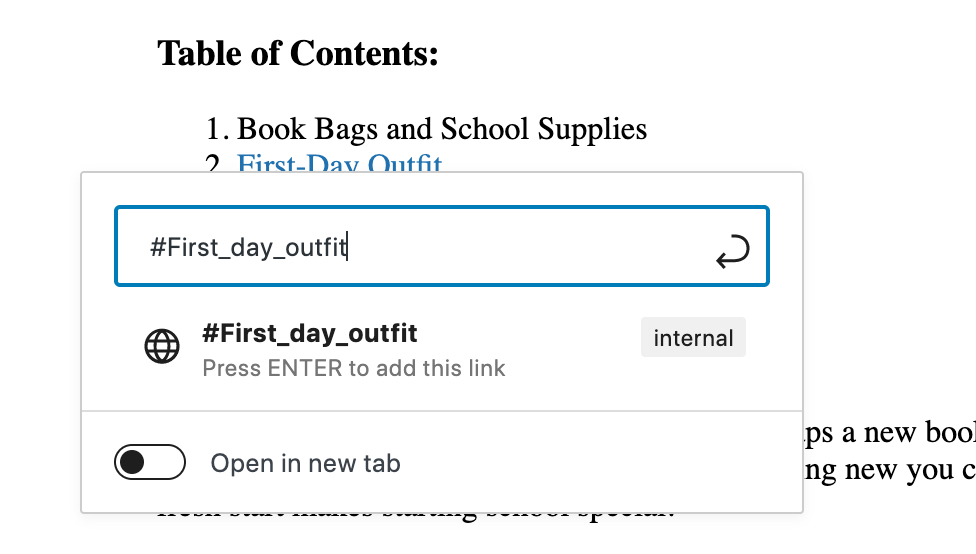
Click Enter. The anchor link will be generated but remain unactivated till a browser can recognize the anchor link as an identifier.
So step number 2 is to let browsers know which area, section, or text you want to “anchor”.
STEP 2: Add an id attribute to the related section.
Scroll down to the section you want to navigate to. It can be a section heading or an entire text paragraph.
First, highlight the block, and click the Advanced tab in the sidebar block settings. You will see a section for inserting the HTML anchor. Now you need to insert the same text you added as the anchor link, except the # prefix:
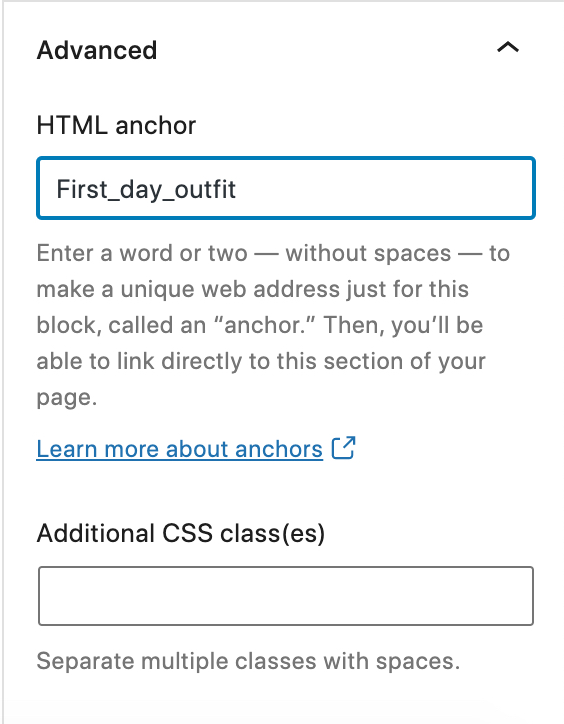
Done! Now, you can preview the post and see your anchor link in action.
Note that this method works for any block whether you need to add anchor links to a WordPress text paragraph or any other blocks.