Paragraphs are the foundation for most text elements on your website — from descriptions and introductions to longer content sections.
To make sure your text looks clean and consistent with the ICF design, there are a few basic settings you should know.

The Toolbar & Block Inserter 🛠️
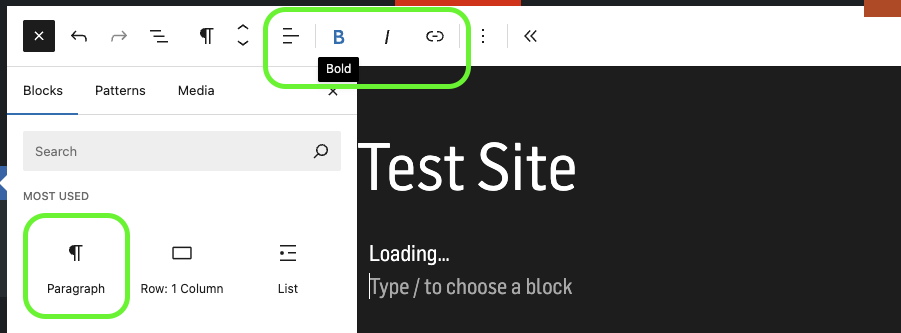
How the new toolbar and block inserter looks like
When you select a Paragraph block, the toolbar appears above it. Here, you can format your text using these options:
Text alignment: left, centered, or right
Bold or italic text
Add links: highlight text → click the link icon → enter a URL or select an internal page
Lists: bulleted or numbered
Text size: adjust via the dropdown (Normal, Small, Large)


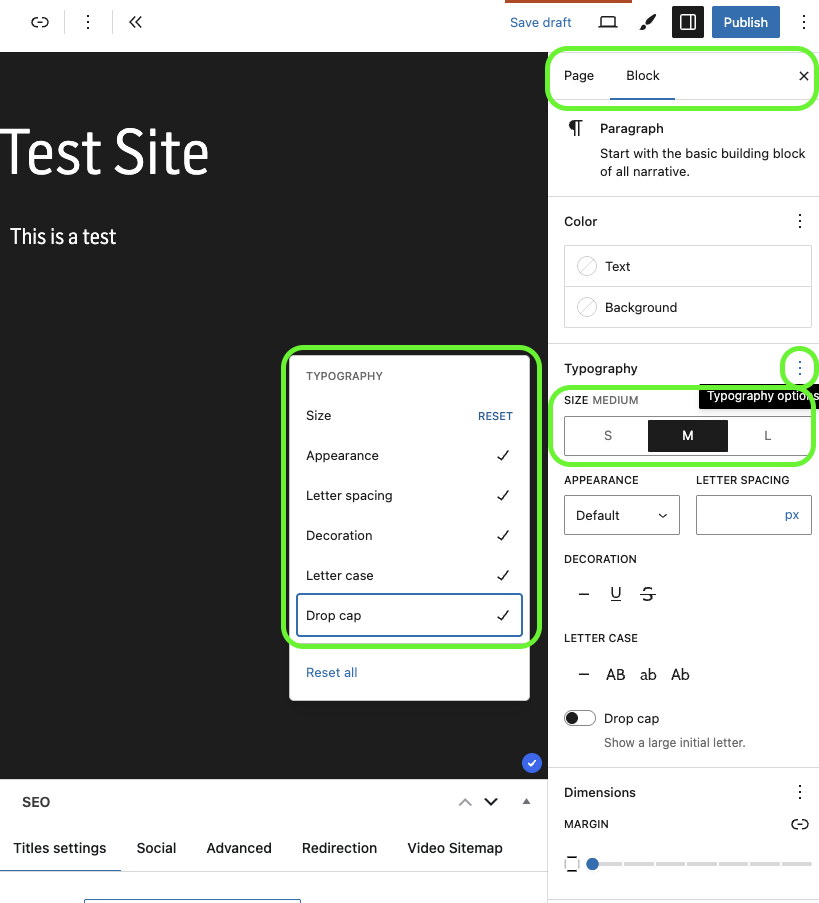
In the right sidebar, you’ll find more options for the Paragraph block:
Size: choose between S (small), M (medium), and L (large)
→ Use this to create a clear text hierarchy
Line height & spacing: adjust if needed for better readability
Color: Do not change text colors!
Text colors are defined by our Corporate Design and are managed globally.

Use Paragraph blocks for all regular text.
Avoid HTML or Classic blocks — they may break the site’s layout.
Keep enough whitespace between blocks for better visual flow.