In the last years, bot & cyberattacks have increased drastically. Therefore, you have to make sure that your account is safe. We have implemented some security upgrades for that 
To have a secure Password, we recommend it to match following requirements:
at least 12 digit Long
at least 1 special character
at least 1 number
at least 1 capital Character
do not have a repeating pattern
Please store your Password in a password manager. We recommend https://1password.com/

Two-Factor Authentication (2FA) adds an extra layer of security to your account by requiring a second verification step, like a code from your phone, in addition to your password. Enabling 2FA helps protect your data even if your password gets compromised.

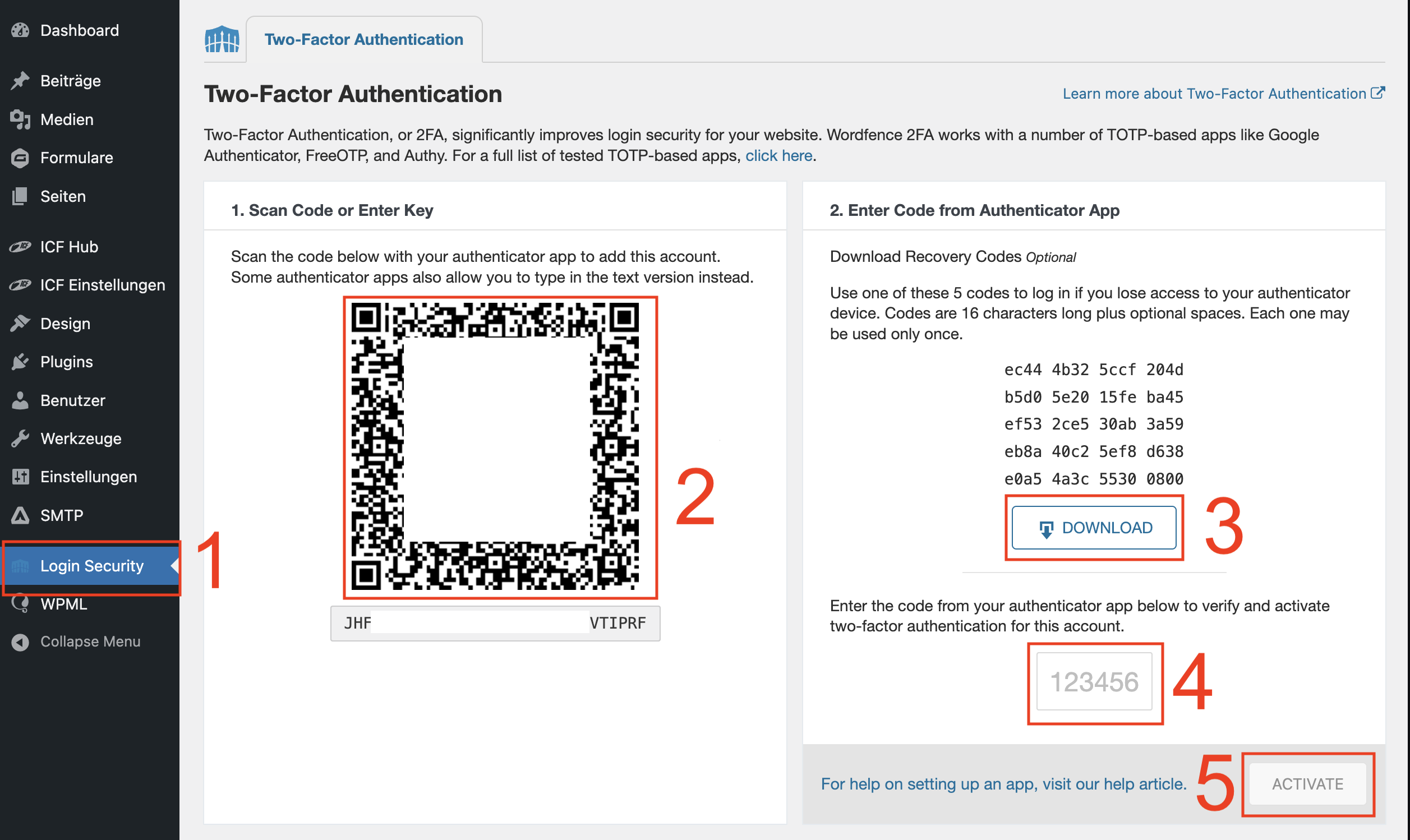
In the left Main navigation, you can find them called “Login Security”
Click on it
Then scan the displayed QR Code with your Password Manager & 2FA app
Save the Backup Codes securely. You need them when you lose access to your authenticator app.
Enter now your generated 2FA Code from your app
Save using “ACTIVATE”
When you log in the next time, you get asked for your 2FA code. Open your app and enter the code.
When you enable the displayed checkbox, you won’t get asked for the 2FA code for the next 30 Days